
Introduction
Have you ever looked at a receipt and wondered how much of the total was the actual product price and how much was sales tax? Perhaps you know you paid $108 for an item, but the receipt is missing the original price. Or maybe you’re comparing two stores and want to understand the pre-tax cost before deciding where to shop.
This is where a reverse sales tax calculator becomes useful. Instead of adding tax to an item’s price, it works backward from the final amount to estimate the original taxable price and the sales tax included in the total.
In the United States, sales tax rules vary by state and local jurisdiction. The correct calculation can depend on the combined tax rate, the items purchased, discounts, shipping charges, and other transaction details. Understanding the reverse calculation helps shoppers review receipts, compare prices, check invoices, and plan purchases more confidently.
This guide explains how reverse sales tax works, when to use it, and what to know before relying on the result.
What Is a Reverse Sales Tax Calculator?
A reverse sales tax calculator determines the pre-tax price and the sales tax portion of a total that already includes tax.
A regular sales tax calculator starts with the taxable price and adds tax. A reverse calculator starts with the tax-inclusive total and separates the two amounts.
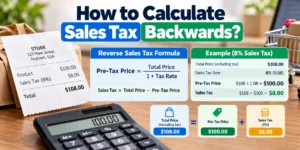
For example, suppose you paid $108 for a taxable item and the applicable sales tax rate was 8%. If the entire $108 consists only of the taxable price and sales tax, the original price was $100 and the tax was $8.
A reverse sales tax calculator can perform this calculation in seconds. It is particularly useful when you know the final amount but need to understand how the purchase was priced before tax.
You can use the CalcZest Reverse Sales Tax Calculator to estimate the original price and tax component from a tax-inclusive total.
How Does Reverse Sales Tax Calculation Work?
The calculation uses the total amount paid and the applicable sales tax rate.
The basic formula is:
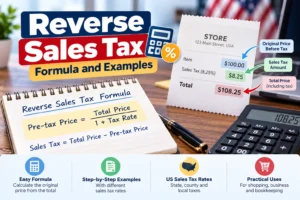
Pre-tax price = Final total ÷ (1 + Sales tax rate)
The tax rate must be expressed as a decimal. For example, 8% becomes 0.08.
Once the pre-tax price is calculated, the tax amount is:
Sales tax = Final total − Pre-tax price
Example: Reverse sales tax at 8%
Suppose your final receipt total is $216, including sales tax at 8%.
Step 1: Convert the tax rate to a decimal.
8% = 0.08
Step 2: Add 1 to the decimal tax rate.
1 + 0.08 = 1.08
Step 3: Divide the final total by 1.08.
$216 ÷ 1.08 = $200
Step 4: Subtract the original price from the final total.
$216 − $200 = $16
The result is:
- Final total: $216
- Pre-tax price: $200
- Sales tax: $16
This example assumes the entire total is made up of a taxable purchase and its sales tax, with no other fees or adjustments.
Why Is the Formula Different From Regular Sales Tax?
When you calculate sales tax normally, you multiply the taxable price by the tax rate.
For example:
- Pre-tax price: $200
- Sales tax rate: 8%
- Tax: $200 × 0.08 = $16
- Final total: $216
In a reverse calculation, you already know the $216 total. You cannot simply multiply $216 by 8% to find the correct tax amount because the $216 already includes the tax.
Multiplying $216 by 8% gives $17.28, which overstates the tax in this example.
The correct method is to divide the total by 1.08 to recover the pre-tax price, then subtract that price from the total. Alternatively, the included tax can be calculated directly using:
Included sales tax = Final total × Tax rate ÷ (1 + Tax rate)
At an 8% rate:
$216 × 0.08 ÷ 1.08 = $16
This distinction is the key to using a reverse sales tax calculator accurately.
Everyday Situations Where a Reverse Sales Tax Calculator Helps
A reverse sales tax calculator is not only for accountants or business owners. It can help with everyday shopping decisions whenever the final price is known but the original price or tax amount is not.
1. Checking a shopping receipt
Imagine buying a kitchen appliance for a total of $539, including an 8% sales tax rate. You want to confirm the original price and tax.
- Final total: $539
- Tax rate: 8%
- Pre-tax price: $539 ÷ 1.08 = $499.07
- Estimated tax: $539 − $499.07 = $39.93
The result is approximately $499.07 before tax and $39.93 in sales tax.
Because retailers round amounts according to their transaction systems, a receipt may differ by a cent from a manual estimate. If the difference is significant, check the actual taxable amount, tax rate, and any additional charges.
2. Comparing prices between stores
Two stores may advertise the same product at different prices, but the final checkout totals can make comparison confusing.
A reverse calculator helps you determine the pre-tax amount when you know the total and applicable tax rate. This is useful when comparing a local store with an online retailer or reviewing a price quote that includes tax.
However, compare like with like. One price might include delivery, installation, or another service, while the other may not. A reverse calculator cannot separate these charges unless you know their amounts and tax treatment.
3. Reviewing online purchases
Online retailers often calculate sales tax based on the delivery destination and the applicable rules. A shopper may see the tax only at checkout, after entering a shipping address.
If an online order totals $162 with an assumed 8% rate, the implied pre-tax amount is:
$162 ÷ 1.08 = $150
The implied tax is $12.
This calculation works only if the entire $162 consists of taxable merchandise and tax. If the order includes shipping or other charges, you may need to remove those charges first or account for their taxability separately.
For more information on online and out-of-state purchases, see the Michigan Department of Treasury’s sales and use tax guidance.
4. Understanding restaurant or service bills
A final bill may include taxable items, exempt items, service charges, delivery charges, or other fees. Reverse calculation can estimate the tax-inclusive price only when you know which portion of the total is subject to the rate being used.
For example, if a bill contains taxable merchandise and a separately listed fee, treating the entire bill as taxable could produce an incorrect estimate.
Do not assume that tips, service charges, or every item on a restaurant or service bill receive identical tax treatment nationwide. State and local rules differ.
5. Reviewing business expense reimbursements
Employees sometimes need to submit receipts for office supplies, equipment, or other work-related purchases. A reverse calculator can help estimate the pre-tax value and sales tax when the receipt shows a tax-inclusive amount.
For reimbursement purposes, however, the original receipt is preferable. The calculator’s result is an estimate and may not match the actual tax collected if the purchase included multiple tax rates, exempt items, or additional fees.
Reverse Sales Tax Examples at Different Rates
The table below shows how the calculation works for several illustrative tax rates. These rates are examples, not statements of the current rate in any particular city.
| Final total | Assumed tax rate | Pre-tax price | Included tax |
| $54.00 | 8% | $50.00 | $4.00 |
| $107.00 | 7% | $100.00 | $7.00 |
| $216.00 | 8% | $200.00 | $16.00 |
| $321.00 | 7% | $300.00 | $21.00 |
| $535.00 | 7% | $500.00 | $35.00 |
These examples assume a single taxable base, one applicable rate, and no other charges. Real receipts may require a more detailed calculation.
How US State and Local Tax Rules Affect Reverse Calculations
The United States does not have one general nationwide retail sales tax rate. State and local governments establish the rules that determine which transactions are taxable, which rates apply, and how the taxable sales price is calculated.
This matters because a reverse sales tax calculator needs the correct rate and tax base to produce a meaningful estimate.
For example, Florida has a general state sales tax rate of 6%, and many counties impose an additional discretionary sales surtax. The applicable combined rate depends on the transaction and relevant local rules. See the Florida Department of Revenue’s official sales tax guidance.
In Texas, the state sales and use tax rate is 6.25%, while local jurisdictions may add tax up to the applicable combined maximum. The Texas Comptroller’s sales and use tax FAQs explain the state’s rules.
These differences mean that a reverse calculation based on an incorrect rate can produce the wrong pre-tax price and tax estimate.
Practical tip: Use the rate shown on the receipt when checking a completed transaction. If you do not have a receipt, verify the applicable rate with the relevant state or local tax authority.
What About Discounts, Shipping, and Extra Fees?
One of the most important limitations of reverse sales tax calculations is that the final amount may contain more than the taxable product price and sales tax.
Discounts and coupons
A seller-funded discount that reduces the selling price may reduce the taxable amount. Other discounts, including certain manufacturer rebates, may be treated differently under state law.
For example, New York generally allows qualifying trade or volume discounts offered at the time of sale to reduce the taxable receipt. The state’s treatment of rebates and other price adjustments can differ. See the New York Department of Taxation and Finance’s taxable receipt guidance.
When reversing a discounted purchase, use the actual amount on which tax was calculated, not automatically the product’s original list price.
Shipping and delivery
Shipping charges may be taxable in some states and exempt in others, depending on the circumstances. If the final total includes shipping, a simple reverse calculator may incorrectly treat the entire amount as taxable merchandise.
Check the relevant state’s guidance on shipping and delivery charges before assuming the entire total uses the same tax rate.
Service charges and other fees
Handling, installation, payment surcharges, environmental fees, and other charges may be included in or excluded from the taxable sales price depending on state law.
If the receipt itemizes these charges, separate them where appropriate before applying the reverse formula. If the charges are not itemized, the calculator alone cannot determine their tax treatment.
Can You Calculate Reverse Sales Tax From a Receipt With Multiple Items?
Yes, but the result may be more complicated than a single division.
Suppose a receipt contains taxable electronics, exempt groceries, and a delivery fee. If the electronics and delivery fee are taxable but the groceries are not, dividing the entire receipt total by one tax multiplier will not accurately recover each component.
To calculate the amounts correctly, you may need to know:
- The price of each item or category.
- Which items are taxable in the relevant jurisdiction.
- The applicable tax rate for each taxable category.
- Whether shipping, handling, or other charges are taxable.
- Any discounts, coupons, or adjustments applied before tax.
When a receipt contains multiple rates or tax treatments, the best approach is to use the itemized receipt and calculate each taxable component separately. A single-rate reverse calculator is most reliable when the entire relevant total is subject to the same rate.
Common Reverse Sales Tax Calculation Mistakes
Avoid these common errors when using a reverse sales tax calculator.
1. Multiplying the final total by the tax rate. This overstates the tax because the final total already includes it. Divide by (1 + r) instead, where (r) is the decimal tax rate.
2. Using the wrong rate. A statewide rate may not include local taxes. Use the combined rate that applies to the transaction.
3. Ignoring fees. Shipping, delivery, and other charges can affect the taxable base. Do not assume every fee is taxable or exempt.
4. Treating every product as taxable. States may exempt certain products or apply special rates to particular categories.
5. Ignoring rounding. Tax is generally reported in currency amounts, and transaction systems may round at different stages. A calculated estimate can differ slightly from the receipt.
6. Confusing sales tax with use tax. Use tax may apply when taxable goods are used in a state and the required sales tax was not paid. The rules and reporting requirements vary by jurisdiction.
For example, Michigan explains that use tax may apply to taxable items purchased online or from out-of-state retailers when the required tax has not been collected. See the Michigan Department of Treasury.
Frequently Asked Questions
What is the formula for reverse sales tax?
Divide the final tax-inclusive total by (1 + r), where (r) is the sales tax rate expressed as a decimal. Subtract the resulting pre-tax price from the total to find the included tax.
How do I remove 8% sales tax from a total?
Divide the final amount by 1.08. For example, $108 ÷ 1.08 = $100 before tax, so the included sales tax is $8.
Can I use a reverse sales tax calculator for online purchases?
Yes, if you know the correct tax rate and the portion of the total subject to that rate. If the order contains shipping, exempt items, discounts, or multiple tax treatments, you may need to adjust the calculation.
Why does my reverse calculation differ from my receipt?
Possible reasons include rounding, an incorrect rate, discounts, taxable shipping, exempt items, or other charges included in the final total. Compare the calculator’s assumptions with the receipt’s itemized breakdown.
Is reverse sales tax the same in every US state?
The mathematical formula is the same when one tax rate applies to the entire taxable amount. However, the applicable rate, taxable base, exemptions, and treatment of additional charges vary by jurisdiction.
Can I calculate sales tax backward without knowing the tax rate?
Not reliably. The same final total could result from different pre-tax prices and tax rates. You need the applicable rate or other information that uniquely determines the transaction.
Conclusion
A reverse sales tax calculator is a practical tool for understanding what is included in a final purchase price. It can help shoppers check receipts, compare prices, review online orders, and estimate the original taxable amount without doing the math manually.
The key is to use the correct tax rate and understand what the final total includes. For a simple purchase with one taxable amount and one rate, dividing the final total by one plus the decimal tax rate provides the pre-tax price. More complicated receipts may require adjustments for discounts, shipping, fees, exempt items, or multiple tax rates.
Try the CalcZest Reverse Sales Tax Calculator to estimate the pre-tax price and included sales tax. For an actual tax dispute or a complex transaction, confirm the details with the relevant state tax authority or a qualified tax professional.
Disclaimer: This article is for general educational purposes and is not legal, tax, or financial advice. US sales and use tax rules vary by state and locality. Verify the rules applicable to your transaction before making tax-related decisions.